What actually gets an Instagram account banned
Meta enforces Instagram's Community Guidelines with a mix of automated review and human moderators, and only a narrow list of report reasons reliably leads to action. In our takedown practice we see the same short set come up: impersonation, non-consensual intimate images, credible threats, hate speech, sexual exploitation of minors, coordinated harassment, and clear copyright or trademark infringement. Files outside those categories — hurt feelings, arguments, opinions you disagree with — rarely produce a suspension no matter how many reports pile up.
The mechanic most searchers get wrong is the "one big number" idea. There isn't one. Meta's Community Standards Enforcement reporting shows the platform actions tens of millions of pieces of content on Instagram in the bullying and harassment category alone each quarter, with the majority flagged by classifiers before any user report is filed (Meta transparency report). A well-evidenced first report on an in-scope violation triggers review. A hundred vague "spam" reports from throwaway accounts get discounted as coordinated inauthentic behaviour and, in some cases, action the reporters.
To ban someone's Instagram account in the sense the search actually wants — permanently, on the profile itself — one of two things has to be true. Either the account matches a policy category Meta enforces on strike, or an authority outside Meta (a court order, a valid DMCA takedown, a right-to-be-forgotten filing) forces removal. Both routes exist. Neither is instant. And each carries a specific, checkable form or channel.
Our founder trained in media-and-defamation law before running takedowns full-time, which is why the Obscura team's guide leads with the correct route for each case, not the loudest one.
Report routes that actually work — and the forms Meta pays attention to
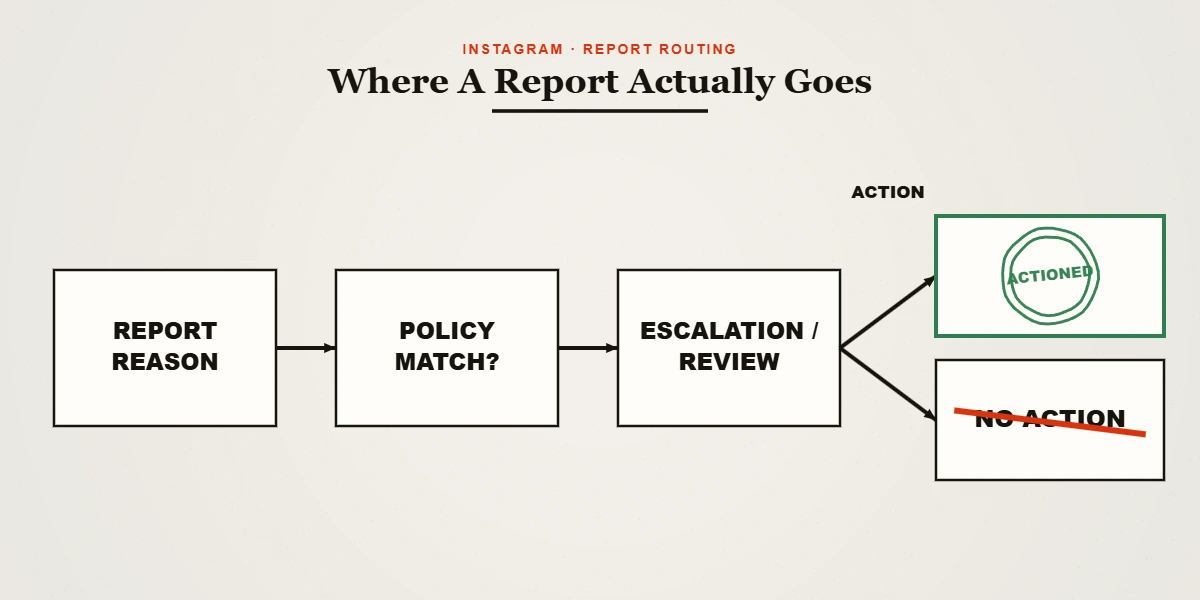
There are five report channels that carry real weight, ranked by how quickly and reliably we see them convert to account-level enforcement.
- Impersonation. Meta operates a dedicated form for accounts pretending to be you or your business, and it accepts non-account holders as filers. You will need to attach a photo of your government ID — Meta's own requirement, non-negotiable, and the reviewer is a human at Meta. Impersonation is one of the fastest categories to a ban when the evidence is clean. Instagram's impersonation form walks through it.
- Non-consensual intimate imagery. Use the StopNCII.org hash-matching service to have the material blocked across Meta platforms without ever sending the image to us or to Meta. Under 18? Use NCMEC's Take It Down. US victims of any age can also cite the federal TAKE IT DOWN Act, which came into force in 2025 and imposes a 48-hour removal duty on covered platforms. This is the single fastest route to a ban we see in casework.
- Copyright and trademark. File a DMCA takedown through Meta's rights-owner portal; the US Copyright Office overview explains what counts as a valid notice. Repeated confirmed strikes on the same account lead to a permanent ban under Meta's repeat-infringer policy. Trademark filings go through a separate form and require registration proof.
- Credible threats, doxxing, sexual exploitation. These skip most of the queue. Reports go through the in-app Report flow, category "Violence or dangerous organisations" or "Bullying or harassment", with the specific sub-reason selected. Attach screenshots and, if the threat is real-world, file with local police before or after — Meta's Law Enforcement Response Team acts on official requests too.
- Underage user (under 13). Meta's minimum age is 13. The under-13 report form still works logged-out. It is one of the highest-conversion routes when the profile itself gives away the age.
Everything else — the "I don't like what they said" report — sits in a general queue where volume, reporter trust score, and pattern-matching against known abuse decide outcomes. In practice that means it stalls.
If you're the target of a mass-report attack
The "get me banned immediately" searches don't only come from attackers. The other half is people who have been on the receiving end of a coordinated brigade — an ex, a rival business, a harassment ring buying a cheap "ban service" of the kind Tripwire has documented for years. Meta's coordinated inauthentic behaviour policy is designed to catch exactly this, and the platform's own transparency data shows large numbers of accounts actioned each quarter for report-brigading and fake engagement rather than for the content they targeted.
If your account has been restricted, disabled or shadow-limited after a report wave, three things matter in order. First, appeal in-app immediately — the appeal window is short, and every hour after the initial action reduces reinstatement odds. Second, gather evidence that the accusation was false or that the reporters are coordinating: screenshots of the reporting accounts, timestamps, shared referral links if you can find them, any external chat where the brigade was organised. Third, if the target is a business or public figure and the reputational hit is measurable, escalate.
Talk to our takedown desk if the report wave came with defamation, impersonation of you, or an NCII component — those overlap our normal caseload, and we handle the appeal-and-counter-report track alongside the legal one.
How to tell if someone got banned on Instagram
Verification is a separate cluster of long-tail queries — how to know, how to tell, how to check — and the answer is more nuanced than the popular "user not found" one-liner.
Four states look similar to an outside viewer and mean different things:
| Signal | Ban | Blocked-you | Deactivated | Deleted |
|---|---|---|---|---|
| Profile page | "Sorry, this page isn't available" | Shows normally to logged-out viewers, hides to you | Same as ban but temporary | Same as ban, permanent |
| Search | Account absent | Absent to you, present to others | Absent | Absent |
| Direct message thread | Greyed, "Instagrammer" placeholder | Still shows their name | Greyed, "Instagrammer" | Greyed, "Instagrammer" |
| Tagged posts | Removed | Still visible | Preserved | Removed |
| Reversibility | Sometimes (appeal) | Instant if they unblock | Any time they log back in | 30-day window then gone |
The clean test for a suspension versus a block: log out or check from a second account. If the profile is gone from the logged-out view too, it's not just you — either the account was banned, deactivated, or deleted. To narrow further, search old tags: bans typically strip tagged posts, deactivations preserve them, and deletions strip them after the 30-day grace window.
There is no in-app confirmation that "reports you filed led to this ban". Meta does not tell reporters when they have won. Any tool or service that claims to notify you when a target is banned is guessing from the same public signals above.
Shadow ban, IP ban, and mass-report bot: what's real
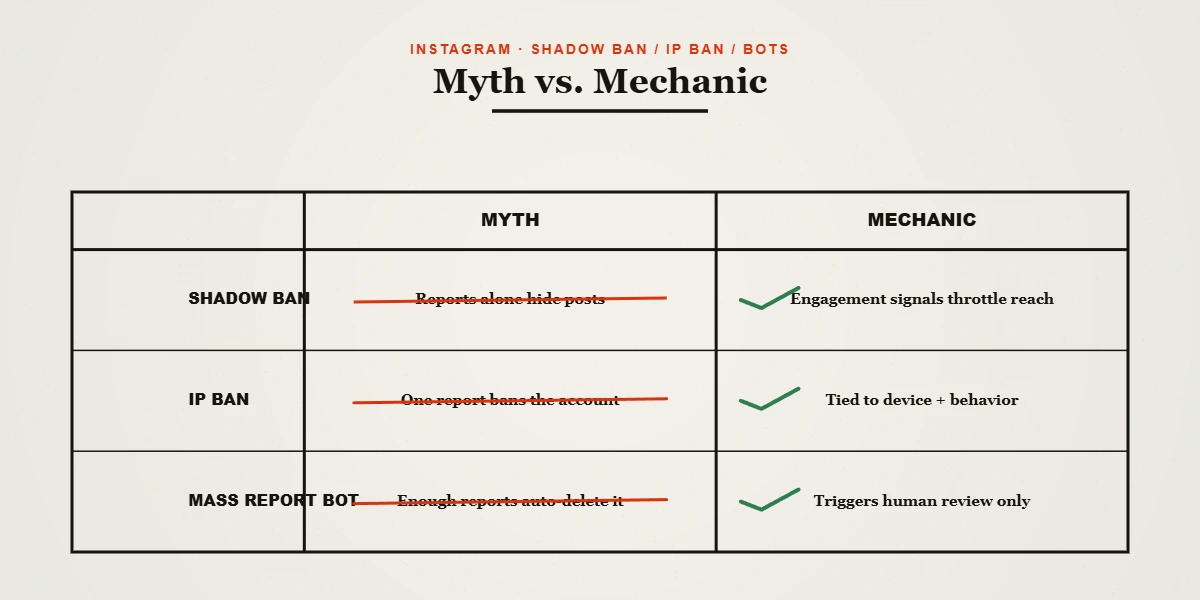
"How to shadow ban someone on Instagram." You cannot. Shadow-limiting on Instagram is an outcome the classifier applies to accounts that hover near guideline breaches — reduced Explore reach, hidden hashtags — not a switch a viewer can flip against another user. The closest user-facing tool is Restrict, which lets you soft-mute someone on your own content: their comments go into a filter, they cannot see when you are online, and they cannot tell you have restricted them. Restrict silences on your surface. It does not shadow-ban them on the platform.
"How to IP ban someone on Instagram." Instagram does not expose IP banning to users. Meta's back-end uses device fingerprint, account graph and IP data to prevent ban evasion when the platform itself removes an account, but "IP ban another user" is not a feature offered anywhere in the app or the Business Suite. Every "IP ban service" advertised online is either lying or selling a proxy setup for the seller's own use.
"How many reports to ban" and "mass-report bots". There is no fixed threshold. Meta explicitly discloses in its transparency reporting that proactive detection accounts for the majority of enforcement on Instagram, and report volume is one signal among many — weighted by reporter age, trust score, and pattern. Automated mass-report tools produce exactly the fingerprint (bursts of low-trust accounts, identical templates) that gets the reporters flagged. The paid "ban services" retail the same pattern. We have seen it boomerang more often than it works.
Ban someone from your comments, live stream, follows or Business page
This is the search intent search engines mix in — the person just wants control on their own surface, not to remove the other user from Instagram.
- From your comments: long-press a comment, tap the exclamation icon, and either delete or restrict the commenter. Under Settings → Privacy → Hidden Words, add words or emojis to auto-hide, and enable "Advanced comment filtering" to hide comments containing common insults and spam.
- From your live stream: during the live, tap the profile of the offending viewer inside the comment reel and choose Block. Blocked accounts cannot see or join the same live again from that account.
- From following you: open their profile, tap the three dots, and "Remove follower". You can also switch your account to private, which requires future follow requests to be approved.
- From your Business page: Meta Business Suite → Inbox → moderation assistant. From here you block a user across the Instagram Business account and Page, hide their existing comments, and set moderation-assistant rules for automatic filtering. It is the only place a business owner can ban someone from their page across future posts without deleting each comment manually.
None of these actions ban the person from Instagram itself. That is a policy question, not a page-owner one.
When "get them banned" isn't the answer
If the account you want removed is a real news organisation reporting a true fact, a satirical account within the rules, or a critic sharing a protected opinion, no report will succeed and forged notices will backfire. We have seen bluffed DMCA notices reinstate content and land the sender in a counter-notice or a lawsuit; the visibility of the Streisand effect that follows is worse than the original post. Obscura will not file a report we do not believe to be true. That is in our disclaimer and — for how we handle the accused party's data — in our privacy stance and lawful-use terms.
The honest paths when a ban is not on the table are search de-indexing (Google's "Results about you" removal for personal information, right-to-be-forgotten filings in the EU and UK), a defamation claim if the post crosses into a false statement of fact, or SERP suppression with authoritative owned content. Which one applies depends on what the post actually says.
If the account attacking you is impersonating you, threatening you, or sharing intimate images without consent, that is Obscura's core work. Get a confidential case review — we do not bulk-report, we do not use bots, and we do not charge until we have a route mapped. For more of our practice notes, see the takedown briefings hub; if the target is on TikTok instead, the enforcement mechanics track closely — how to get someone banned on TikTok walks the platform-specific version.